
Delegates can moderate an existing conference for which they are assigned delegate privileges. However, a delegate cannot delegate the conference to another user or delete it. You can assign multiple users as delegates for the same conference.
A host can add delegates as follows:
- On the Meet-Me Conference Modify page, click the Delegates tab.
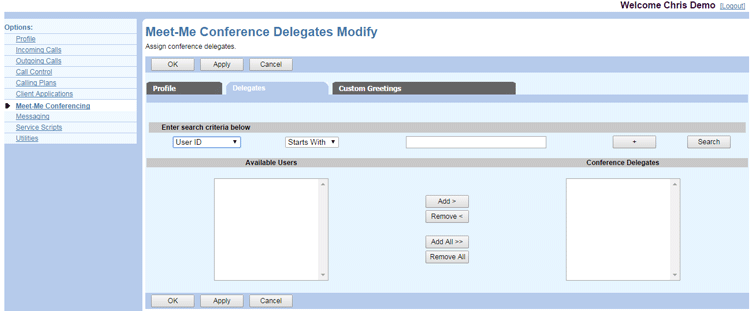
- Search for users to assign as conference delegates. To display specific users, enter your search criteria and click Search. To display all available users, leave the search fields blank and click Search. Search results are listed in the Available Users column.
NOTE: The Available Users are selected from a list of hosts on the same bridge as the conference.
Select the user(s) in the Available Users column and click Add. To add all available users, click Add All. The users are moved to the Conference Delegates column. - To unassign delegates, select the users in the Conference Delegates column and click Remove, or click Remove All to unassign all delegates.
- Click OK or Apply to save changes, or Cancel to exit without saving.