
Skip Navigation

Add a Custom Greeting to a Conference

NOTE: You must add your custom greetings to your Announcement Repository before you can use them with this service.

A host can add a custom welcome message to a conference as follows:

  1. On the Meet-Me Conference Modify page, click the Custom Greetings tab.
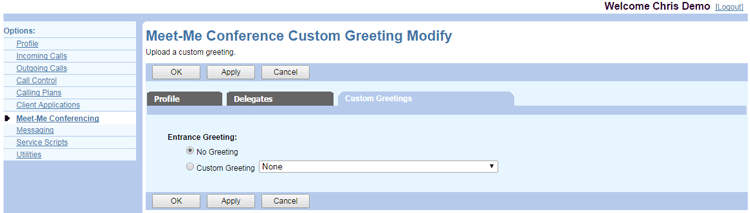
    User-Meet-Me-Conference-Modify-Greetings
  2. The default option for the Entrance Greeting is No Greeting. Click Custom Greeting and select a greeting from the dropdown list.
  3. Click OK or Apply to save changes, or Cancel to exit without saving.

Need more help:

We’re ready to answer any of your questions. Visit our Technical Support page for phone numbers and web portal links.

For more inspiration:

Read the TPx Blog for insights that will help keep your business running at full speed.

Need more help:

We’re ready to answer any of your questions. Visit our Technical Support page for phone numbers and web portal links.

Request a Consultation

"*" indicates required fields

* By submitting this form, you are accepting TPx’s privacy policy .