
What is MSx WAN?
MSx WAN is our managed Software-Defined Wide Area Network (SD-WAN) solution. It connects your business locations using any combination of transport services, including broadband, dedicated internet, cellular (4G/5G), or MPLS.
It dynamically selects the best available path for network traffic to improve performance, reliability, and application experience across your WAN.
Why Customers Choose MSx WAN
As businesses grow and rely more on cloud and distributed applications, traditional networks can become complex, inflexible, and difficult to manage.
MSx WAN simplifies this by delivering a modern, flexible network that improves performance, reliability, and visibility—while reducing operational burden.
Improve Performance and User Experience
MSx WAN continuously evaluates network conditions and dynamically routes traffic to ensure critical applications—like voice, video, and cloud services—perform reliably.
Increase Availability and Resilience
By leveraging multiple active connections, MSx WAN keeps your business running even if a circuit fails, automatically shifting traffic to the best available path.
Gain Visibility and Control
Real-time dashboards and reporting provide insight into network performance, application usage, and traffic patterns—helping you make informed decisions and optimize your network over time.
Simplify Network Operations
TPx delivers a turnkey solution that includes deployment, monitoring, and ongoing support—reducing complexity and freeing your team to focus on strategic initiatives.
A Managed Approach to SD-WAN
MSx WAN combines advanced SD-WAN technology with TPx’s managed services expertise to deliver reliable, high-performance networking without the complexity of managing it yourself.
From initial deployment to ongoing operations, TPx helps ensure your network is optimized, secure, and aligned to your business needs.
Service Levels Overview
TPx offers two service levels for MSx WAN: Standard/Core and Advanced/Optimum.
Both include the same SD-WAN features, and implementation experience:
- Same technology and capabilities
- Same onboarding and deployment
- Same 24x7x365 monitoring, alerting, and visibility
The difference is how your service is supported
Service Levels At-a-Glance Difference
Standard/Core = Monitor + Notify (Customer Directed)
Advanced/Optimum = Monitor + Act (TPx Managed)
| Capability | Standard/Core | Advanced/Optimum |
| Monitoring & Alerts | Included | Included |
| Customer Notification | Included | Included |
| Proactive Troubleshooting | N/A | Included |
| Ongoing Remediation | Billable | Included |
| Third-Party Mgmt (Add-on) | Optional/Reactive Response | Optional/Proactive Response |
Incident Management (Troubleshooting) Standard/Core vs. Advanced/Optimum
Standard/Core (Customer-Directed)
- TPx monitors your network and notifies you of issues
- Service cases are automatically created for alerts
- TPx only acts when you request support
- You manage day-to-day operations
Result: When requested, TPx provides troubleshooting and remediation support. Activities—such as advanced troubleshooting, configuration changes, or non-standard requests—may be billable under Standard/Core .
Best for: Customers with internal IT expertise who want visibility and control
Advanced/Optimum (TPx-Managed)
TPx monitors your network and proactively investigates and resolves issues related to device down, link down, and high availability failover events.
- TPx performs ongoing administration, troubleshooting, and remediation
- TPx manages escalation and issue resolution end-to-end
Result: Service impacting issues are addressed quickly without requiring customer involvement
Best for: Customers who want a managed experience with minimal operational burden
Optional Add-On: Third-Party Vendor Management
For Standard/Core and Advanced/Optimum customers using their own internet providers (aka: Bring your Own Bandwidth BYOB, or Over the Top OTT) this service is available as an optional add-on and requires authorization. Third-party Vendor Management allows:
- TPx can act as your single point of contact
- TPx opens, manages, and escalates carrier tickets
- Helps accelerate issue resolution
Co-Managed Flexibility
Both Standard/Core and Advanced/Optimum support co-managed environments.
Customers can ask for access to the SD-WAN Orchestrator to:
- Make configuration changes
- Manage network settings
- Monitor performance and usage
How Support and Charges Work
- Standard/Core:
- Support is provided on request
- Certain activities may be billable depending on the nature of the request
- Advanced/Optimum:
- Ongoing troubleshooting, remediation, and operational support are included
- Designed to minimize unexpected support costs
Monitoring & Reporting (Included in All Service Levels)
TPx provides continuous monitoring and real-time visibility through the SD-WAN Orchestrator dashboards and reporting tools, including:
- Network and device status
- Bandwidth and traffic trends
- Application performance and QoE
- Latency, jitter, and packet loss
- Application and device usage insights
MSx SD-WAN Implementation and Onboarding
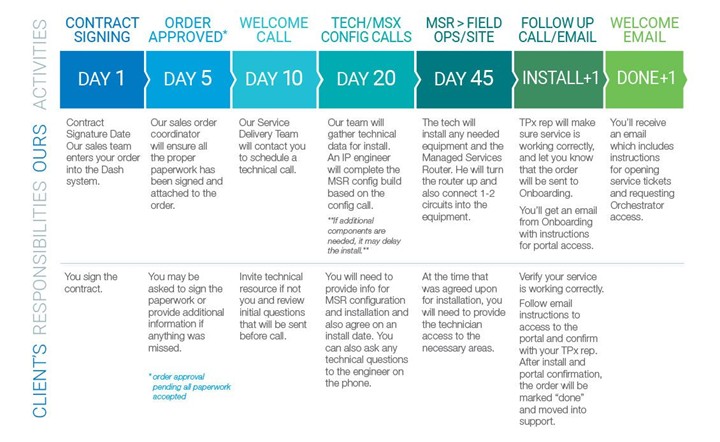
The following charts illustrate TPx project schedules for MSx Managed SD-WAN, including tasks and the length of each activity. A Project Manager (PM) will be assigned and monitor all aspects of the project, with respect to internal and external resources. This ensures that the Service is configured properly prior to operation of the network. The overall scope and goals of this project are to deliver the following:
A MSx Managed SD-WAN project is based on a forty-five business day schedule.
TPx makes your SD-WAN installation quick and easy.
Installation Options
MSR Remote Installation
The preconfigured MSR will be shipped at the specified customer location. The customer is responsible to cross connect the circuits and connect the power adapter.
MSR Professional Installation
TPx Technicians are available to assist with your service installation. If you choose to use TPx Professional Services for your installation, we will preschedule a time for a Qualified Professional to arrive at your install address and perform the following tasks:
- Mount all equipment in a secure and safe manner according to manufacturer guidelines and recommendations. This includes mounting on walls or in data racks and cabinets (mounting hardware sold separately)
- Confirm power requirements are met and adequate for the equipment being installed.
- Power on all devices and confirm programming.
- Locate and tag any TPx provided WAN circuits on both ends of the DMARC extension.
- Cross connect circuits from WAN circuit provider’s handoff to the End User’s preferred equipment installation location. (End User is responsible for providing available pairs or data cables to complete the extension. TPx has relationships with cabling specialist and can offer their services at an additional charge if the end user requires them.)
- Plug all circuits into TPx equipment and test connectivity and performance.
- Troubleshoot any issues and provide a corrective course of action to TPx Support and the End User for any identified issues.
- Assist End User in plugging their equipment into the TPx device and perform tests to confirm successful equipment installation.
- Work with TPx Support to confirm all End User ordered services are connected and performing as expected.