
Hoteling allows users to share phones on an as-needed basis (for instance, in a visitor’s office). As a Hoteling Guest, you associate your service profile with a Hoteling Host user. This enables you to use the host’s phone with your own service profile.
Activate Your Hoteling Guest Profile on the Host Phone
- Log in to ucx.telepacific.com.
- Click Call Control on the left-hand menu.
- On the Call Control page, click the Hoteling Guest link in the Advanced column.
- The Hoteling Guest page opens.
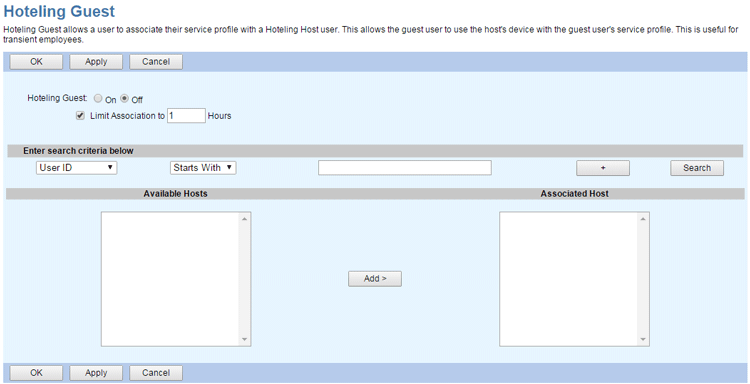
- Set Hoteling Guest to On.
- Use the Limit Association to check box to set a timeout limit on the hotel-guest association. This limit must be equal to or less than the Host Association Limit of the Hoteling Host, which will appear above the Limit Association to check box after a host is associated.
- To select the Hoteling Host, click the Search button to populate the list of Available Hosts; you may also enter search criteria to filter the list. Select the desired host on the Available Hosts column, then click Add to set it as the Associated Host.
- Click OK or Apply to save your changes, or Cancel to exit without saving.
Deactivate Your Hoteling Guest Profile on the Host Phone
To deactivate your user profile on the host phone:
- On the Hoteling Guest page, set Hoteling Guest to Off.
- Click OK or Apply to save your changes, or Cancel to exit without saving.